Framework Extensions
vertebra.extensions connects Vertebra's HTTP server, worker pools, database drivers, and object storage to Litestar, SQLSpec, SQLAlchemy, Advanced Alchemy, Django, gRPC, and Oracle APEX.
Litestar Integration
Use VertebraPlugin and VertebraConfig to run a Litestar app on Vertebra's native HTTP server while offloading CORS, response compression, and static files:
from litestar import Litestar, get
from vertebra.extensions.litestar import VertebraConfig, VertebraPlugin


@get("/hello")
async def hello() -> dict[str, str]:
    return {"hello": "litestar"}


app = Litestar(
    route_handlers=[hello],
    plugins=[VertebraPlugin(VertebraConfig())],
)
Pass swap_memory_response_cache=True to replace Litestar's default response cache store with Vertebra's memory store. Attach create_channels_plugin for pub/sub channels.
CLI Integration
- Litestar CLI override: When
VertebraPluginis registered on a Litestar app, runninglitestar --app app:app runlaunches Vertebra's server supervisor. Standard Litestar run flags work alongside Vertebra worker, topology, thread, and drain options. - Auto-integration: Running an unmodified Litestar, FastAPI, Starlette, or Flask app with
vtb run app:appattaches the matching integration automatically. - Custom CLI commands: Plugins implementing
on_cli_initcan register subcommands on thevtbCLI. Callbacks declaringapporenvparameters receive the resolved application and environment automatically.
Routing, Channels, and Stores
- Compiled routing and fast path: Vertebra compiles Litestar routes into its native HTTP router and dispatches simple handlers directly when no custom guards or middleware transforms apply.
- Realtime channels:
create_channels_pluginbacks Litestar channels with Memory, Valkey, Redis, PostgreSQL, or Oracle pub/sub, including origin-node deduplication and clean shutdown. - Stores: Valkey (with RESP3 client-tracking invalidation), Redis, Memory, and response cache stores implement Litestar's Store interface with prefix-scoped deletion.
Litestar Ecosystem Plugins
Install optional Litestar ecosystem bridges as separate extras under vertebra.extensions.litestar:
| Plugin | Module | Extra | Purpose |
|---|---|---|---|
| Queues | vertebra.extensions.litestar.queues |
queues |
Background queue backends over database queue stores, shared memory, SQLSpec, and DI container providers. |
| Security | vertebra.extensions.litestar.security |
security |
Native JWT validation, trusted mTLS/XFCC ingress identity, and rate-limiting guards. |
| Autowire | vertebra.extensions.litestar.autowire |
autowire |
Controller discovery wired ahead of route compilation. |
vertebra.extensions.litestar.email |
email |
Amazon SES backend with native SigV4 signing and no botocore dependency. | |
| MCP | vertebra.extensions.litestar.mcp |
mcp |
Object-store skill loading, cached well-known agent cards, and accelerated JSON-RPC framing. |
| Vite | vertebra.extensions.litestar.vite |
vite |
Vite plugin integration resolving bundled TypeScript client assets. |
| AsyncAPI | vertebra.extensions.litestar.asyncapi |
asyncapi |
Schema documentation for background tasks and WebSocket channels. |
| HTMX | vertebra.extensions.litestar.htmx |
htmx |
HTMX response headers, partials, and push-URL helpers. |
Register VertebraPlugin alongside any of these optional plugins:
from litestar import Litestar
from vertebra.extensions.litestar import (
    VertebraConfig,
    VertebraPlugin,
)

app = Litestar(
    plugins=[
        VertebraPlugin(VertebraConfig()),
    ],
)
SQLSpec Integration
vertebra.extensions.sqlspec provides per-engine adapters for SQLSpec 0.74.1+, statement pipelining, shared-memory connection proxying, and ADK, Events, and Litestar stores.
- Per-engine adapters: Dedicated subpackages cover PostgreSQL, MySQL, SQLite, Oracle, SQL Server, DuckDB, BigQuery, Spanner, and Spangres, each paired with sync and async data dictionaries for schema introspection.
- ADK, Events, and Litestar stores: Every engine config wires session, memory, artifact, event-queue, and Litestar stores. Binary ADK artifacts are stored in object storage via
ArtifactReferenceinstead of database columns. - Shared-memory proxy:
ProxySyncConfigandProxyAsyncConfiglease pooled connections from the parent process over shared memory so multi-worker deployments keep a bounded connection count. - Pipelining:
execute_stackbatches supported execute stacks through native pipelining and returns results in order. Other stacks run sequentially within a transaction. - Change feeds and events: Event backends persist durable checkpoints and spill payloads over 8,000 bytes to object storage or an event queue, using LISTEN/NOTIFY on PostgreSQL and TxEventQ/AQ on Oracle.
- Object storage:
ObjectStoreBackendintegrates with SQLSpec's storage registry for streaming Arrow/Parquet I/O, copies, moves, and presigned URLs.
from vertebra.extensions.sqlspec import (
    PostgresAsyncConfig,
    SQLiteSyncConfig,
    create_sqlspec_plugin,
)

sqlite_cfg = SQLiteSyncConfig(path=":memory:")
pg_cfg = PostgresAsyncConfig(dsn="postgresql://app_user:secret@localhost:5432/app")
sqlspec_plugin = create_sqlspec_plugin(sqlite_cfg, pg_cfg)
SQLAlchemy and Advanced Alchemy
vertebra.extensions.alchemy and vertebra.extensions.sqlalchemy support SQLAlchemy 2.1+, Alembic 1.18+, and Advanced Alchemy 1.12+ on top of Vertebra's native drivers and caching backends.
For DuckDB or GCP SQLAlchemy dialects, add the matching extra:
- URL schemes and pooling: Registers sync and async
+vertebraand+vtbdialect schemes across PostgreSQL, MySQL, SQLite, Oracle, SQL Server, DuckDB, BigQuery, Spanner, and Spangres oververtebra.db.dbapi. - Relational file and TCP URLs default to queue pooling; in-memory SQLite uses static pooling; BigQuery, Spanner, and Spangres default to null pooling.
- Append
?broker=trueto use the default registered shared-memory broker (raisesImproperConfigurationErrorif unregistered), or?shm_broker=truefor null pooling. - Caching:
create_cache_configwires Advanced Alchemy and SQLAlchemy compiled/result caches over shared memory, Valkey, Redis, cloud or local object storage, or in-memory backends with no extra dependencies. Passuse_dogpile=True(with thedogpileextra) if you need dogpile cache plugins. - Column types:
Vectorcolumns (with engine-specific variants for PostgreSQL, Oracle, and Spanner) support cosine, L2, L1, and inner-product distance queries.MsgspecJSONmaps to JSONB on PostgreSQL, CockroachDB, Spangres, and SQLite, NVARCHAR(MAX) on SQL Server, and JSON on Oracle. - File attachments:
ObjectStoreBackendintegrates with Advanced Alchemy file attachment model fields. - Alembic migrations: Registers DuckDB, BigQuery, Spanner, and Spangres migration implementations, batches online Spanner and Spangres DDL via update-DDL calls (emitting per-statement SQL in offline mode), supports autogenerate for vector and JSON columns, and adds vector index and view operations.
BigQuery, Spanner, and Spangres use statement autocommit: commit and rollback calls do not group or undo completed statements, and disabling autocommit raises NotSupportedError. Spangres also disables two-phase commit.
from vertebra.extensions.alchemy import (
    ObjectStoreBackend,
    create_alchemy_plugin,
    create_async_alchemy_config,
    create_cache_config,
)
from vertebra.storage import SyncObjectStore

cache_cfg, cache_mgr = create_cache_config("shm:///vtb-app-cache")
alchemy_config = create_async_alchemy_config(
    connection_string="sqlite+vtb_async:///:memory:",
    cache_config=cache_cfg,
)
alchemy_plugin = create_alchemy_plugin(alchemy_config)

store = SyncObjectStore("memory://")
backend = ObjectStoreBackend(store=store, prefix="uploads")
Django Integration
Install the django extra for Django 6.0+ integration across databases, caching, background tasks, and channels:
- Databases: Native backends for PostgreSQL, MySQL, Oracle, SQLite, and Spanner (requires
django-google-spanner). BigQuery, DuckDB, and SQL Server are not supported as Django database backends and raiseImproperConfigurationErrorat startup; use SQLAlchemy or SQLSpec for those engines. - Caching:
CacheBackendsupports shared memory, Valkey, Redis, object storage, and in-memory stores. - Background tasks:
TaskBackendbacks Django tasks over Vertebra queue stores and runs workers viapython manage.py vertebra_workerwith scoped dependency injection. - Channels:
ChannelLayerbacks Django Channels over Memory, Valkey, Redis, PostgreSQL, or Oracle.
DATABASES = {
    "default": {
        "ENGINE": "vertebra.extensions.django.db.backends.postgresql",
        "OPTIONS": {"dsn": "postgresql://app_user:secret@localhost:5432/app"},
    }
}

CACHES = {
    "default": {
        "BACKEND": "vertebra.extensions.django.cache.CacheBackend",
        "LOCATION": "shm:///vtb-django-cache",
    }
}

TASKS = {
    "default": {
        "BACKEND": "vertebra.extensions.django.tasks.TaskBackend",
        "OPTIONS": {
            "BACKEND_URL": "postgresql://app_user:secret@localhost:5432/app"
        },
    }
}

CHANNEL_LAYERS = {
    "default": {
        "BACKEND": "vertebra.extensions.django.channels.ChannelLayer",
        "CONFIG": {"url": "valkey://localhost:6379/0"},
    }
}
gRPC Services
GrpcServiceRegistry and @grpc_method route HTTP/2 gRPC requests to typed Python handlers across unary, server-streaming, client-streaming, and bidirectional-streaming RPCs. ProtobufSchemaGenerator generates .proto definitions from your msgspec models:
import msgspec
from vertebra.extensions.grpc import (
    GrpcContext,
    GrpcServiceRegistry,
    ProtobufSchemaGenerator,
    grpc_method,
)


class LookupRequest(msgspec.Struct):
    sku: str


class LookupReply(msgspec.Struct):
    sku: str
    available: int


registry = GrpcServiceRegistry()


@grpc_method(service="Inventory", package="inventory", name="Lookup")
async def lookup(request: LookupRequest, ctx: GrpcContext) -> LookupReply:
    return LookupReply(sku=request.sku, available=42)


registry.register(lookup)
schema_gen = ProtobufSchemaGenerator(package="inventory")
proto_source = schema_gen.generate_from_registry(registry)
Oracle APEX Gateway
Extend Oracle APEX applications incrementally with vertebra.extensions.apex and @vertebra/client/apex:
- Session and security: Scope Oracle sessions automatically with
DBMS_SESSION.SET_IDENTIFIER, verify handoff tokens, and guard PL/SQL mutations with confirmation gates. - Islands and offline sync: Mount Vite-bundled React, Vue, or Svelte islands inside APEX regions and replay offline mutations with conflict detection.
- Federated queries and 26ai Duality Views: Join Oracle tables with Parquet/S3 datasets through DataFusion, and expose Oracle 26ai JSON Relational Duality Views as OpenAPI endpoints and MCP tools with ETag concurrency checks.
Shared-Memory Session Broker
BrokerPlugin lets multiple Python worker processes share one bounded database connection pool over shared memory instead of opening a separate pool per worker.
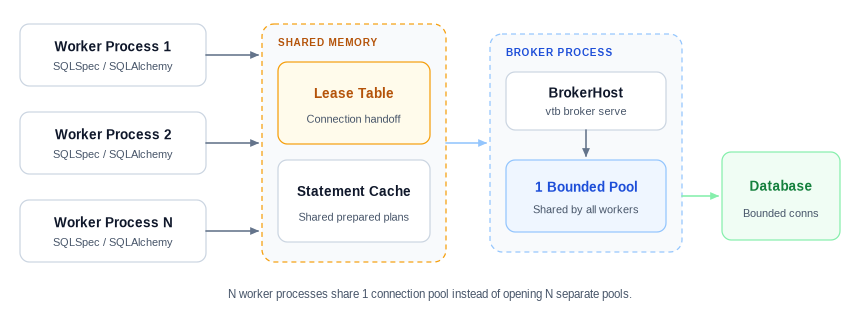
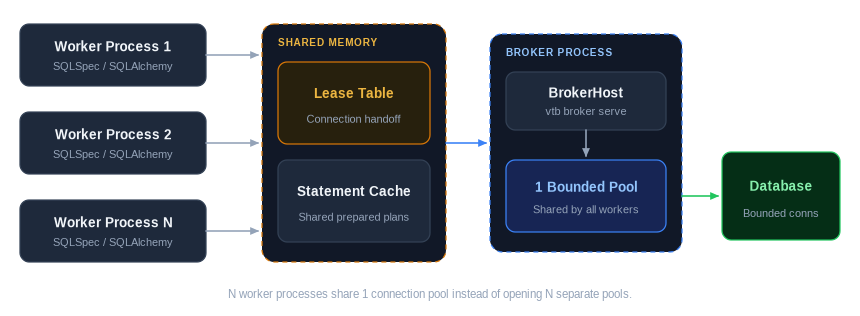
- Attaching workers: Workers attach by shared-memory name or over an authenticated Unix domain socket using
VERTEBRA_BROKER_SECRET. - Supervision and recovery: Run
vtb broker serveto host pools and drain or roll back active connections on shutdown. If a worker crashes or a check-in fails, the broker quarantines the slot, rolls back the server transaction, disposes the dirty connection, and raisesLeaseQuarantinedError. Inspect pool health withvtb broker status. - SQLAlchemy and Advanced Alchemy: Pass
SyncBrokerPool(or its async variant) andbroker_creatorto engine creation, or pass a transport to your Advanced Alchemy config factory.
from sqlalchemy import create_engine, text
from vertebra.extensions.broker import (
    BrokerConfig,
    BrokerHost,
    SyncSHMBrokerTransport,
)
from vertebra.extensions.sqlalchemy import SyncBrokerPool, broker_creator

config = BrokerConfig(pool_size=4, shm_name="/vtb-app-broker", role="owner")
with BrokerHost(config) as host:
    worker_cfg = BrokerConfig(
        pool_size=4,
        shm_name="/vtb-app-broker",
        role="worker",
    )
    transport = SyncSHMBrokerTransport(worker_cfg)
    pool_cls = SyncBrokerPool.bind_class(
        broker=transport,
        url="sqlite+vtb:///app.db",
    )
    engine = create_engine(
        "sqlite+vtb:///app.db",
        poolclass=pool_cls,
        creator=broker_creator("sqlite+vtb:///app.db", broker=transport),
    )
    with engine.connect() as conn:
        value = conn.execute(text("SELECT 1")).scalar_one()
    engine.dispose()
    transport.close()