Cloud SQL & AlloyDB Dialers
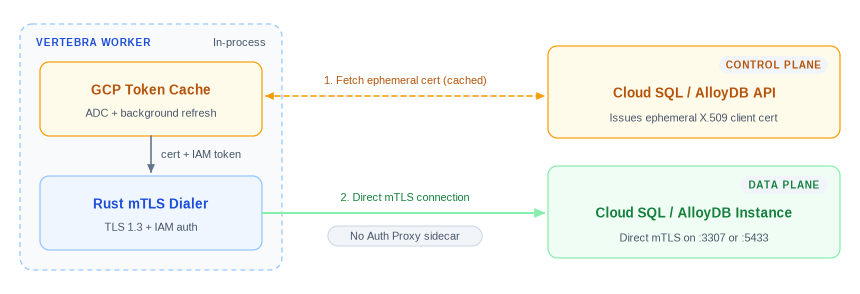
vertebra.db.dialer connects directly to Google Cloud SQL (port 3307), Google Cloud AlloyDB (port 5433), AWS RDS / Aurora / Aurora DSQL, and Azure Entra ID databases without a separate proxy sidecar container.
Cloud SQL and AlloyDB
Set cloud_sql_instance or alloydb_instance_uri directly on PostgreSQLConfig for integrated pooling, or construct a sync or async dialer with Application Default Credentials and IAM database auth:
from vertebra.db import (
    AlloyDBConfig,
    CloudSQLConfig,
    SyncAlloyDBDialer,
    SyncCloudSQLDialer,
)
from vertebra.db.adapters.postgres import PostgreSQLConfig

pg_cloud_sql = PostgreSQLConfig(
    dsn="postgresql://iam_user@localhost/orders",
    cloud_sql_instance="my-project:us-central1:orders-db",
    enable_iam_auth=True,
)
pg_alloydb = PostgreSQLConfig(
    dsn="postgresql://iam_user@localhost/orders",
    alloydb_instance_uri=(
        "projects/my-project/locations/us-central1/clusters/prod/instances/primary"
    ),
    enable_iam_auth=True,
)

cloudsql = SyncCloudSQLDialer(
    CloudSQLConfig(
        instance_connection_name="my-project:us-central1:orders-db",
        enable_iam_auth=True,
    )
)
alloydb = SyncAlloyDBDialer(
    AlloyDBConfig(
        instance_uri=(
            "projects/my-project/locations/us-central1/"
            "clusters/prod/instances/primary"
        ),
        enable_iam_auth=True,
    )
)
Connection Behavior and Retries
- Cloud SQL: Parses
project:region:instancenames (including domain-scoped projects), fetches ephemeral X.509 client certificates via the SQL Admin API, and opens a TLS 1.3 connection on port 3307 for PostgreSQL, MySQL, or SQL Server. - AlloyDB: Parses full instance URIs, fetches client certificates, and completes the port 5433 metadata handshake for built-in or IAM token authentication.
- Columnar engine settings: When an AlloyDB URI or
enable_alloydb_columnar_engine=Trueis configured on PostgreSQL, Vertebra enables the AlloyDB columnar engine session parameters automatically. - Transient retries: Cloud SQL, AlloyDB, PostgreSQL, MySQL, MSSQL, and SQLSpec driver configs retry transient Admin API and connect errors using jittered exponential backoff. Tune
connector_retry_count(default 3; 0 disables retries),connector_retry_delay(default 0.5 seconds), andconnector_retry_max_delay(default 5.0 seconds). - Fail-fast errors: Permanent errors—such as TLS verification failures (
ssl.SSLError), HTTP 400/401/403/404/409 responses, IAM auth failures, and invalid configs—fail immediately without retrying. - In-database embeddings: Pair AlloyDB connections with in-database vector embeddings to evaluate embeddings directly inside SQL.
AWS RDS, Aurora, and Aurora DSQL
Use the AWS dialers to combine full-verification TLS with cached SigV4 IAM auth tokens, then unpack connection_kwargs() into your PostgreSQL or MySQL config:
from vertebra.db import (
    SyncAwsAuroraDsqlDialer,
    SyncAwsRdsDialer,
    aws_rds_root_ca_pem,
)
from vertebra.db.adapters.mysql import MySQLConfig
from vertebra.db.adapters.postgres import PostgreSQLConfig

rds_pg = SyncAwsRdsDialer(
    "orders.c9akciq32.us-east-1.rds.amazonaws.com",
    username="iam_user",
    database="orders",
)
pg_rds_config = PostgreSQLConfig(**rds_pg.connection_kwargs())

rds_mysql = SyncAwsRdsDialer(
    "catalog.cluster-abc123xyz.us-east-1.rds.amazonaws.com",
    engine="mysql",
    username="iam_catalog",
    database="catalog",
)
mysql_rds_config = MySQLConfig(**rds_mysql.connection_kwargs())

dsql = SyncAwsAuroraDsqlDialer(
    "abc123def456.dsql.us-east-1.on.aws",
    admin=True,
)
pg_dsql_config = PostgreSQLConfig(**dsql.connection_kwargs(database="postgres"))
rds_ca_pem = aws_rds_root_ca_pem()
- RDS, Aurora, and RDS Proxy: Supports instance, cluster, reader, proxy, China, and GovCloud endpoints. Pins TLS verification against the bundled AWS RDS root CA and refreshes SigV4 tokens for PostgreSQL (port 5432) and MySQL (port 3306).
- Aurora DSQL: Parses cluster endpoints, verifies certificates against public roots (or a custom
ca_pem), and signs connect tokens (or admin tokens whenadmin=True).
Azure Entra ID
Use the Azure Entra dialers for Azure Database for PostgreSQL, Azure Database for MySQL, and Azure SQL Database or Managed Instance. Tokens are cached and acquired through Managed Identity, Workload Identity federation, or client credentials:
from vertebra.db import SyncAzureEntraDialer
from vertebra.db.adapters.mssql import MSSQLConfig
from vertebra.db.adapters.mysql import MySQLConfig
from vertebra.db.adapters.postgres import PostgreSQLConfig

azure_pg = SyncAzureEntraDialer(
    "orders-pg.postgres.database.azure.com",
    username="entra_app",
    database="orders",
)
pg_azure_config = PostgreSQLConfig(**azure_pg.connection_kwargs())

azure_mysql = SyncAzureEntraDialer(
    "catalog-mysql.mysql.database.azure.com",
    username="entra_catalog",
    database="catalog",
)
mysql_azure_config = MySQLConfig(**azure_mysql.connection_kwargs())

azure_mssql = SyncAzureEntraDialer(
    "ledger-sql.database.windows.net",
    database="ledger",
)
mssql_azure_config = MSSQLConfig(**azure_mssql.connection_kwargs())
The dialer infers the engine (PostgreSQL on port 5432, MySQL on port 3306, or SQL Server on port 1433 with FEDAUTH and required encryption) and the matching Entra OAuth2 scope from commercial, Government, and China hostnames. Pass engine= to override detection, or authority_host= / AZURE_AUTHORITY_HOST to override the Entra authority.
TLS Defaults for Cloud Token Auth
When a config carries an AWS or Azure token provider and targets a remote server, Vertebra verifies the server certificate before sending the token:
| Config | Default when unset | Rejected on remote hosts | Allowed when set explicitly |
|---|---|---|---|
PostgreSQLConfig |
sslmode=verify-full |
disable, allow, prefer |
require, verify-ca, verify-full |
MySQLConfig |
ssl_mode=verify-full |
disable, prefer |
require, verify-ca, verify-full |
MSSQLConfig |
encryption="required" |
unencrypted or login-only encryption, trust_server_certificate=True |
required, strict |
Rejected settings raise ImproperConfigurationError. Loopback hosts, Unix sockets, and Cloud SQL targets keep their normal defaults so local test servers work. RDS uses the bundled RDS root CAs unless you provide a custom CA; Aurora DSQL and Azure use public roots. On MySQL, ssl_mode stores only what you set, while canonical_ssl_mode reports the effective mode.